 Why It Went to Spam
What is DKIM?
Short answer
DKIM (DomainKeys Identified Mail) adds a digital signature to every message you send. The receiving server fetches your public key from DNS and checks the signature. A pass shows that a domain took responsibility for the message and that the signed parts weren't changed on the way.
The detail
DKIM lets a domain put its name on a message and take responsibility for it.[1] It does this with a signature that a receiving server can check.
How the signature works
DKIM uses a pair of keys. These are two long codes made together, as a matched set.
- The private key stays on your sending server. It adds a signature to every message you send.[2]
- The public key goes in your domain's DNS, as a TXT record.[2] Anyone can read it.
When your mail arrives, the receiving server reads the signature. Then it fetches your public key from DNS to check it.[1]
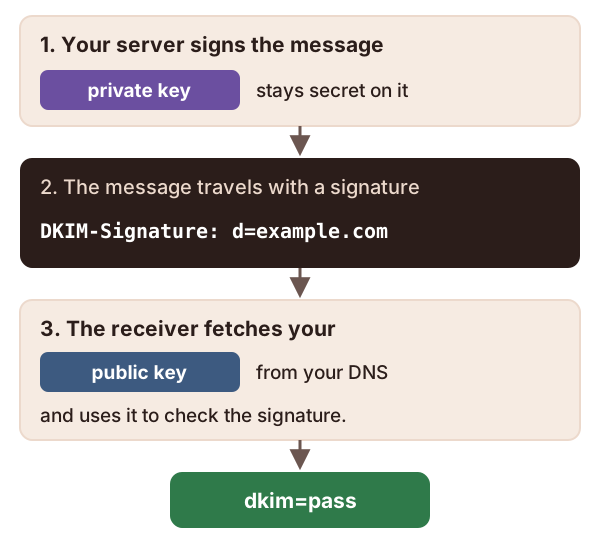
Yahoo sums up what a pass tells it. It can link the message to the signer, and confirm the content wasn't changed in transit.[3]
Reading the signature header
The signature travels in a header called DKIM-Signature. It holds several tags. Two matter most when you're fixing things.
d=is the signing domain, the domain taking responsibility.s=is the selector. It's a name that picks out which public key to use.[1]
Together they tell the receiver exactly where to find the key. The receiver joins them up as selector._domainkey.domain.[1] So if a message carries d=example.com; s=mail2026, the receiver looks up this name:
mail2026._domainkey.example.com
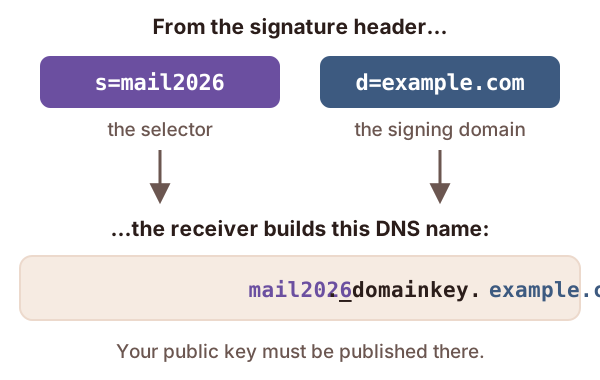
That's a handy check when DKIM fails. Look up that exact name. If there's no record there, you've found the problem.
How long should the key be?
Key length is measured in bits. Short keys are easier to crack.[4] The DKIM rules say keys must be at least 1024 bits, and should be at least 2048.[4] Gmail won't accept anything shorter than 1024 bits.[5]
Google's advice is simple. If your DNS host supports 2048-bit keys, choose 2048.[2]
Changing keys safely
Selectors exist so a domain can have more than one key at a time.[1] That makes it easy to swap in a new key without breaking mail.
The standard describes the swap. Publish the new key under a new selector. Switch your server to sign with it. Leave the old key up for a while, since some mail is still on its way. Then remove the old one.[1]
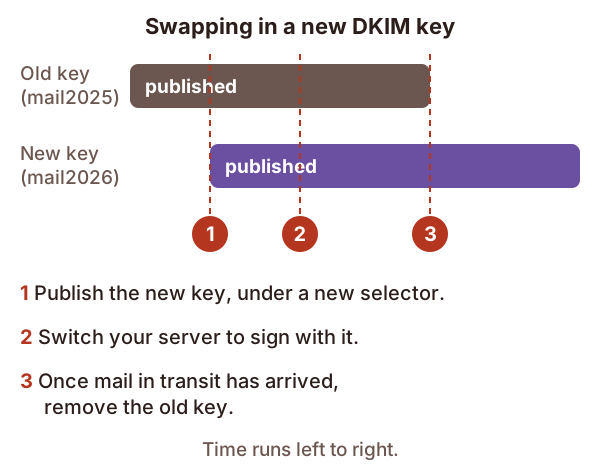
Don't put a new key under an old selector name. The standard says new keys belong under new selectors.[1] To cancel a key, publish its record with an empty p= value.[1]
What DKIM can't do on its own
It doesn't check the From address. A signature can come from any domain at all, even a spammer's.[6] DKIM keeps "who signed this" separate from "who wrote this".[1] DMARC is what links the two.
Changes on the way can break it. Some mail systems change messages as they pass through, and that can break the signature.[1] Google gives a common example: a gateway that adds a footer to every outgoing message.[2]
The good news is that plain forwarding usually leaves DKIM intact.[6] That makes it sturdier than SPF for forwarded mail.
Checks to try, in this order
- Find
dkim=in the headers of a recent message. See how to read email headers. - If there's no DKIM result at all, signing isn't switched on. Turn it on in each service that sends for you.
- If it fails, look up
selector._domainkey.domainusing thes=andd=values. - If the key is there, look for anything that edits mail after signing, such as a footer or a link rewriter.
- Check that
d=is your domain, not your provider's. DMARC needs it to match your From address.
Sources
- RFC 6376: DomainKeys Identified Mail (DKIM) Signatures, IETF (accessed 2026-10-18)
- Set up DKIM, Google Workspace Admin Help (accessed 2026-10-18)
- Sender Best Practices, Yahoo (accessed 2026-10-18)
- RFC 8301: Cryptographic Algorithm and Key Usage Update to DomainKeys Identified Mail (DKIM), IETF (accessed 2026-10-18)
- Email sender guidelines, Google (Gmail Help) (accessed 2026-10-18)
- RFC 9989: Domain-Based Message Authentication, Reporting, and Conformance (DMARC), IETF (accessed 2026-10-18)