 Why It Went to Spam
What is BIMI, and why isn't my logo showing in the inbox?
Short answer
BIMI is a standard that lets your logo appear next to your email in the inbox. It needs DMARC, an SVG logo, a TXT record in your DNS and, for Gmail, a paid certificate. It's about branding. It does not fix spam placement, and even with everything set up, a logo is not guaranteed.
The detail
BIMI is a nice extra. It isn't a deliverability fix. This page explains what it is, so you can decide whether you need it.
What BIMI is
BIMI stands for Brand Indicators for Message Identification. Google describes it as a standard you can use to add your organization's logo to outgoing email messages.[1] Mail apps that support it show the logo next to your message in the recipient's mailbox.
In Gmail, the logo is checked by a third party. Google says BIMI requires third-party certification for your domain and logo.[1] That is why you can't just upload a picture.
It won't get you out of spam
BIMI comes after authentication, not before. Wikipedia says the standard needs a valid DMARC record with a policy of either quarantine or reject.[2] Google says you need to set up DMARC for your domain.[1] If mail is landing in spam, fix that first. Start with our pages on DMARC and how to roll it out.
What you need
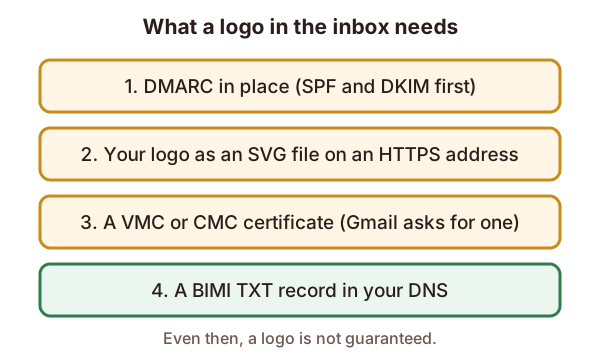
- DMARC. Wikipedia says the policy must be quarantine or reject.[2] A policy of
p=noneisn't enough by that description. Check the current rules with each provider, because they can change. - Your logo as an SVG. Google says logos used with BIMI must be in Scalable Vector Graphics (SVG) file format.[1]
- An HTTPS address for the logo. Wikipedia says the only supported transport for the SVG address is HTTPS.[2]
- A certificate, for Gmail. Wikipedia says services such as Gmail require a VMC to be presented with the TXT record.[2] Google names two kinds: a Verified Mark Certificate (VMC) or a Common Mark Certificate (CMC), from a third-party certificate authority.[1]
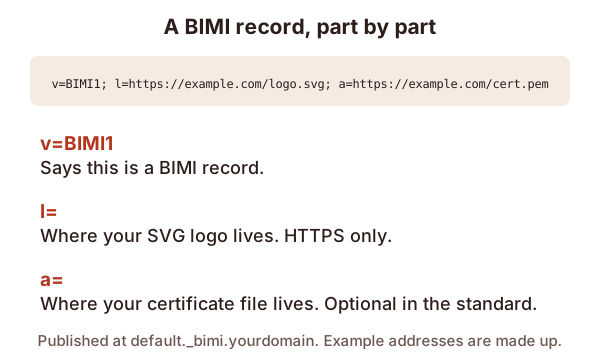
- A BIMI TXT record in your DNS. Google says to add it at your domain provider.[1]
After you add it
Be patient. Google says it can take up to 48 hours for your logo to show in recipients' mailboxes.[1]
Support is also uneven. Google says non-Gmail web apps do not support this feature.[1] So some readers will never see your logo.
Why the logo still isn't showing
You can do every step and still see no logo. Wikipedia says these factors alone will not guarantee a logo is displayed.[2] It adds that heuristics (like spam and spoofing) and reputation are a key part.[2] That means your standing as a sender still counts. Our page on sender reputation covers it.
Work down this list:
- Does DMARC pass, with a quarantine or reject policy?
- Is the logo a valid SVG on an HTTPS address?
- Is the certificate valid for your domain and logo?
- Has it been 48 hours since you added the record?
- Is the reader using an app that supports BIMI?
Sources
- Set up BIMI, Google (Workspace Help) (accessed 2026-10-29)
- Brand Indicators for Message Identification, Wikipedia (accessed 2026-10-29)