 Why It Went to Spam
Why does forwarded email fail authentication?
Short answer
SPF checks which server delivered the message. When a message is forwarded, a different server delivers it, so SPF can fail even though the mail is real. A DKIM signature usually survives forwarding, so signing your mail is the best protection. A newer protocol called ARC lets forwarders vouch for what they saw, but receivers don't have to trust it.
The detail
You send a real message from your domain. Your SPF record is right. Yet one reader says it landed in spam, or bounced. Often the reader has an old address that forwards to a new one.
Why SPF breaks
SPF compares the sending server with your list of allowed servers. The SPF page has the basics.
A forwarder sits in the middle. It takes your message and passes it on. The next mailbox now sees the forwarder's server, not yours. The forwarder isn't on your list.[1]
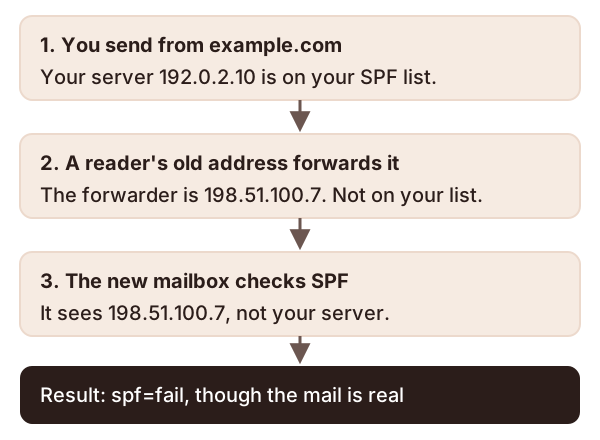
Nothing is wrong with your record. SPF just can't tell a forwarder from a stranger.
Why this can hurt DMARC
DMARC passes when SPF or DKIM passes and matches the From domain. If SPF fails because of forwarding, DKIM has to carry the message.
That's the good news. Plain forwarding usually leaves DKIM intact.[2] The signature travels with the message.
So sign your mail. See what DKIM is. It's the main fix you control.
What breaks DKIM too
Some middlemen change the message on its way. That often breaks authentication.[3] A changed message no longer matches its signature.
Mailing lists are the usual case. They take your message and repost it to subscribers.[3] Both SPF and DKIM can fail after that.
What ARC is
ARC stands for Authenticated Received Chain. It gives a message a signed "chain of custody".[3] Each handler adds a note about the checks it ran. The next one can read the notes.
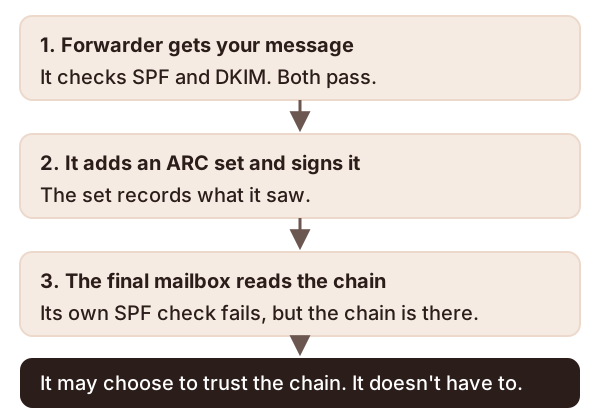
A receiver may use that chain when it decides about DMARC. But it's only a choice. The standard says a receiver may accept the chain's findings.[3] It isn't required to.
ARC is also labeled Experimental.[3] It's the handlers in the middle that add the notes, not you.
Checks to try, in this order
- Ask the reader whether the mail was forwarded from another address.
- Get a copy of the message headers. See how to read email headers.
- Check the SPF and DKIM results. A forwarded message often shows SPF failing and DKIM passing.
- If DKIM isn't passing, set up signing for every service that sends as you.
- Going to a strict DMARC policy? Read the rollout steps first.
Sources
- How email authentication works in Microsoft 365, Microsoft Learn (accessed 2026-10-18)
- RFC 9989: Domain-Based Message Authentication, Reporting, and Conformance (DMARC), IETF (accessed 2026-10-18)
- RFC 8617: The Authenticated Received Chain (ARC) Protocol, IETF (accessed 2026-10-24)