 Why It Went to Spam
Can I send bulk email from a Gmail address?
Short answer
You can, but it often goes wrong. When a newsletter tool sends mail with your @gmail.com address in the From line, SPF and DKIM belong to the tool, not to Gmail, so DMARC can't match. Gmail's own guidance says not to impersonate Gmail From: headers. The fix is a domain you own.
The detail
It feels like the easy way to start. You already have a Gmail address, your readers know it, and your newsletter tool lets you type it into the From box. Then the mail lands in spam. Here's why.
Why it goes wrong
Start with the From line. The DMARC standard calls the domain in it the Author Domain, the domain of the apparent author taken from the From header.[1] If your From address is [email protected], the Author Domain is gmail.com.
Now think about who actually sent the message. Your newsletter tool did. Its servers carry the mail, and they usually sign it with the tool's own domain. Those checks can pass for the tool. They can't pass for gmail.com.
DMARC wants a match. The standard says a message gets a DMARC pass if a DKIM-authenticated identifier aligns with the Author Domain.[1] Yahoo says it simply. The From domain must be aligned with either the SPF domain or the DKIM domain.[2] It adds that this is required for DMARC alignment.[2]
Here, nothing lines up.
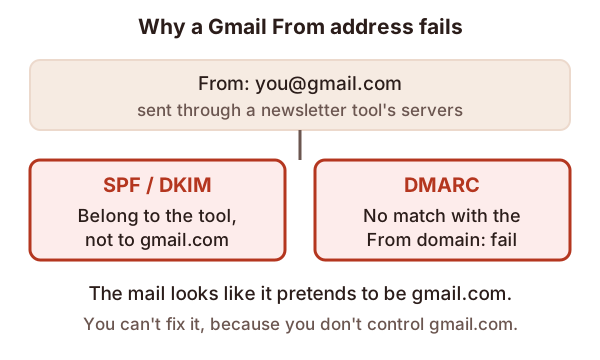
To the receiving server, this looks a lot like someone pretending to be Gmail. Our page on what DMARC is explains the match in more detail.
What Gmail says about it
Google is direct. Its sender guidelines say not to impersonate Gmail From: headers.[3] They add that doing so might impact your email delivery.[3]
A related rule covers names. Google lists "using an @gmail.com domain as the display name for bulk email" as a kind of deceptive display name.[3] So putting a Gmail address into the name part of the From line is out as well.
More generally, Google says not to impersonate other domains or senders without permission.[3]
Can you fix it from inside Gmail?
No. SPF, DKIM and DMARC are DNS records, and gmail.com's records belong to Google. You can't add your newsletter tool to them. You can't change them at all.
So no setting in the tool will make a Gmail From address line up. The only thing you control is which address you send from.
The fix: use a domain you own
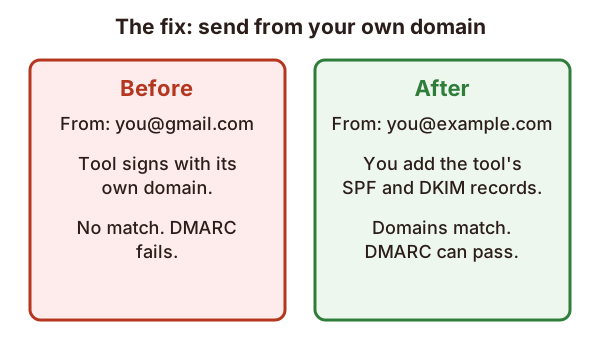
Send from an address on your own domain, like [email protected].
- Get a domain. If you have a website, you may have one already. Our page on sending from a subdomain helps you decide where bulk mail should come from.
- Add the tool's records. Your newsletter tool shows you the SPF and DKIM records to publish. Google says to authenticate with SPF and DKIM that are aligned with each other at the organizational level.[3] Our guides on SPF and DKIM cover the steps.
- Publish a DMARC record. Start gently. Our page on rolling out DMARC shows how.
- Send a test and read the headers. Check that SPF or DKIM passes for your own domain. Our page on reading email headers shows where to look.
Check your tool's help pages too. Many tools say which From addresses they accept.
Sources
- RFC 9989: Domain-Based Message Authentication, Reporting, and Conformance (DMARC), IETF (accessed 2026-11-01)
- Sender best practices, Yahoo (accessed 2026-11-01)
- Email sender guidelines, Google (Gmail Help) (accessed 2026-11-01)