 Why It Went to Spam
Should I send bulk email from a subdomain?
Short answer
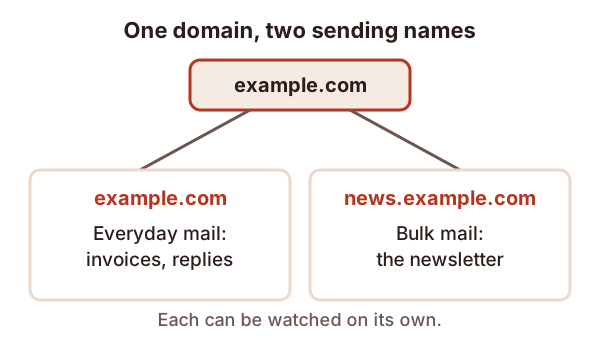
Many senders put newsletters on a subdomain such as news.example.com, so marketing mail is tracked apart from everyday mail. It can help you see problems clearly. It doesn't let you skip the rules: Gmail counts all subdomains of one domain together, and each subdomain needs its own SPF record.
The detail
A subdomain is a name added in front of your domain. If your domain is example.com, then news.example.com is a subdomain. Some senders use one just for bulk mail, so newsletters and everyday mail are kept apart.
Why people do it
Yahoo says each DKIM domain has a reputation.[1] If you sign newsletters with news.example.com, that name builds its own track record. Your day-to-day mail from example.com has a separate one. At least, that's the idea.
No provider publishes how closely it ties a subdomain to its parent, so don't count on a wall between them. Treat a subdomain as a way to see and sort out trouble, not as a shield.
There's a plainer benefit too. Google lets you add a subdomain to Postmaster Tools, which shows its dashboards on their own.[2] That makes it easier to tell whether a problem comes from your newsletter or from your office mail. Our page on sender reputation shows what those dashboards measure.
What a subdomain doesn't do
It doesn't dodge the bulk sender rules. Gmail counts messages from the same primary domain together.[3] Split 6,000 messages across three subdomains and Gmail still sees one sender. See the bulk sender rules.
It doesn't cover for bad habits. Spam reports and bought lists hurt whichever name you send from.
What to set up
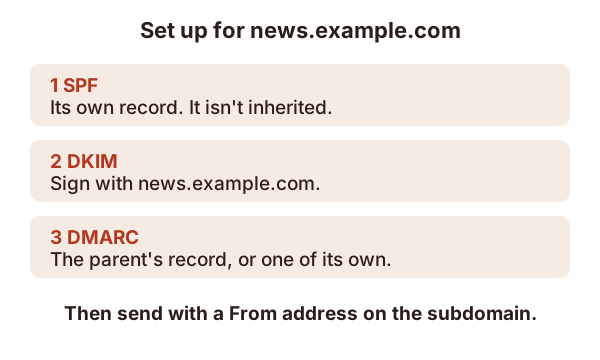
- SPF on the subdomain. Subdomains don't inherit the SPF record of the parent domain.[4] The subdomain needs its own. Our page on writing an SPF record shows how.
- DKIM signing with the subdomain. Sign the newsletters with the subdomain as the signing domain. See what DKIM is.
- DMARC that reaches it. A DMARC record can apply to subdomains of the name where it's published.[5] You can also publish a separate record on the subdomain. Our page on rolling out DMARC covers the policy steps.
Then send from the subdomain's address, so the From domain matches what passed.
Keep your expectations honest
A new subdomain starts with no track record. Warm it up slowly, just as you would a new domain. The reputation page covers how.
Sources
- Sender Best Practices, Yahoo (accessed 2026-10-18)
- Set up Postmaster Tools, Google (Gmail Help) (accessed 2026-10-18)
- Email sender guidelines FAQ, Google (Gmail Help) (accessed 2026-10-18)
- How email authentication works in Microsoft 365, Microsoft Learn (accessed 2026-10-18)
- RFC 9989: Domain-Based Message Authentication, Reporting, and Conformance (DMARC), IETF (accessed 2026-10-18)