 Why It Went to Spam
What is a spam trap, and how did I hit one?
Short answer
A spam trap is an email address made to catch unwanted mail. No real person signs up with it, so any message it gets counts as unsolicited. You can't see which addresses are traps. You can keep them off your list by mailing only people who asked, and by confirming each sign-up.
The detail
Most spam filters judge mail by how it looks. A spam trap works another way. It waits for someone to mail an address that should never get mail.
What a spam trap is
A spam trap is an email address made to lure spam, not to talk to anyone.[1] Wikipedia calls it a honeypot, which is a bait set out to catch something.[1]
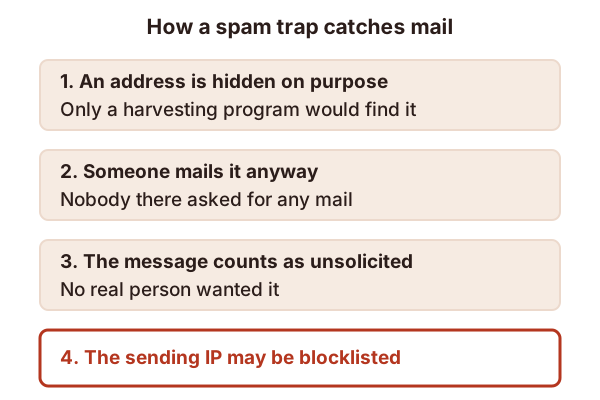
The address is usually hidden where a person won't see it. Only a program that scrapes the web for addresses will find it.[1] No real sender has a reason to write to it. So any message that arrives counts as unsolicited.[1]
Why it matters to you
Trap owners use what they catch. Wikipedia says the sending IP address can be added to a blocklist.[1] Spamhaus says it watches mail at spam traps as well as at normal mail servers, looking for signs of infected computers.[2]
So one trap hit isn't a bounce you'd ever see. There's no error message. You may only notice the result later, as spam-folder placement or a listing. Our page on blocklists shows how to check.
How a real sender ends up mailing one
You didn't choose to write to a trap. It got onto your list some other way. These are the ways the sources describe.
- A bought or scraped list. Yahoo tells senders not to purchase mailing lists.[3] Mail to people who never asked is the very thing a trap exists to catch.
- Sign-ups nobody confirmed. Wikipedia says a third party can subscribe a trap to a list, but only if that list doesn't use confirmed opt-in.[1] Anyone can type any address into an open form.
- Addresses you never cleaned. Google says to automatically unsubscribe people whose mail has bounced several times.[4]
Be honest about the limit here. No provider publishes a list of its traps. We found no source that says how any trap picks its addresses. So you can't check your list against a list of traps. You can only avoid the habits above.
How to keep them off your list
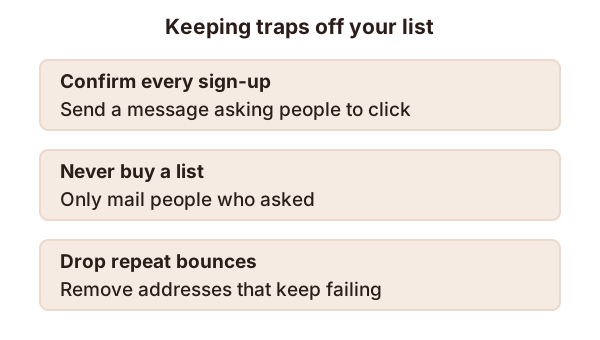
- Mail only people who asked. Yahoo says to check that you're only sending to users who specifically requested your mail.[3]
- Confirm every sign-up. Send a message that asks the person to click and confirm.[3] Yahoo says this keeps out fake addresses and most robots.[3]
- Never buy a list.[3]
- Remove repeat bounces. Don't keep mailing an address that keeps failing.[4] Our page on bounce codes helps you read them.
If you think you hit one
Start with the same checks as for any delivery problem. Look at your bounces, and see whether your IP address is listed. Our page on sender reputation explains how to rebuild trust. Then fix how addresses reach your list. Removing the cause matters more than removing any one address.
Sources
- Spamtrap, Wikipedia (accessed 2026-10-28)
- FAQs: DNSBL usage, Spamhaus (accessed 2026-10-28)
- Sender Best Practices, Yahoo (accessed 2026-10-28)
- Email sender guidelines, Google (Gmail Help) (accessed 2026-10-28)