 Why It Went to Spam
What do email bounce codes mean?
Short answer
A bounce code is a short number in the message your mail system sends back when delivery fails. The first digit matters most. A 4 means a temporary problem, and your server will try again. A 5 means a permanent one, so fix something before you send again. Then read the plain-words text beside the number.
The detail
When a message can't be delivered, you get an automatic reply, often called a bounce. It holds a code made of numbers. The code looks cryptic. It isn't. Two parts matter, and the first digit does most of the work.
Two codes, side by side
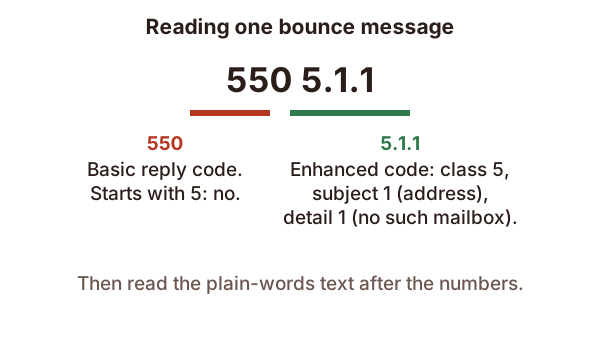
Most bounces show two codes. Take 550 5.1.1.
The first, 550, is the basic reply from the receiving server. The second, 5.1.1, is an enhanced status code. Its pattern is class, then subject, then detail.[1] Class says how bad it is. Subject says what area the problem is in. Detail says exactly what.
Start with the first digit
A code starting with 4 is temporary. The standard says the action may be requested again.[2] Your sending server does that for you. It keeps retrying, and the standard says it should give up only after at least 4 to 5 days.[2]
A code starting with 5 is permanent. The standard says the sender should not repeat the exact request.[2] A permanent failure isn't likely to be fixed by resending the message in its current form.[1] Something has to change first.
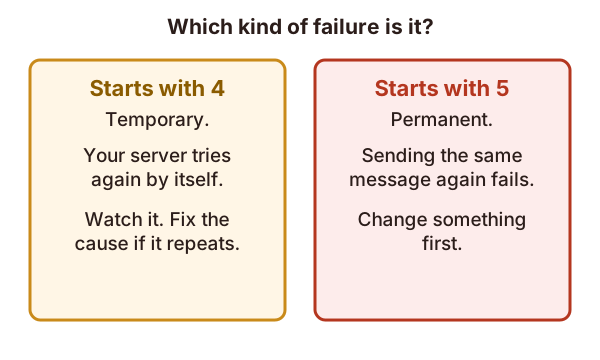
So with a 4, you mostly wait and watch. With a 5, you hunt for the cause. A 4 that keeps coming back for days is worth chasing too.
Codes you'll meet most
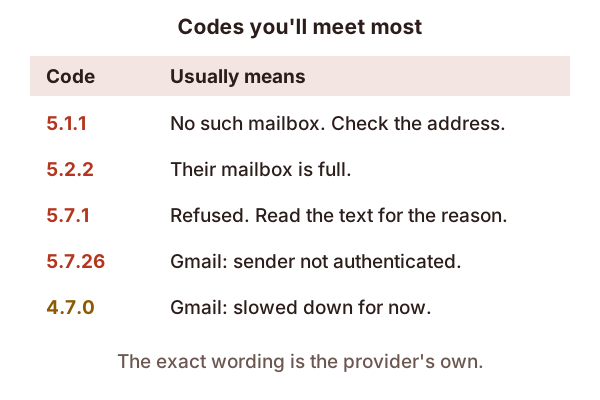
- 5.1.1: no such mailbox. The standard says the mailbox in the address doesn't exist.[1] Gmail says the account you tried to reach does not exist.[3] Look for a typo, then remove the address from your list.
- 5.2.2: mailbox full. The recipient went over their storage limit.[1] Gmail words it as an inbox out of storage space and inactive.[3] It's their problem, not yours. Try later or reach them another way.
- 5.7.1: refused. The standard describes this as the sender not being authorized to send to the destination.[1] That can mean many things. The text after the number tells you which, so read it.
- 5.7.26: not authenticated. Gmail uses it when it blocks a sender who isn't authenticated.[3] Check SPF, DKIM and DMARC.
- 4.7.0: slowed down. Gmail uses this code with a message that your sending IP address has been temporarily rate limited.[3] See what sender reputation is.
The words matter more than the number
The numbers follow a standard. The sentence beside them is the provider's own. That sentence often names the exact rule you broke, and sometimes links to a help page. Copy it whole into a search, along with the provider's name.
The same code can come with different reasons. A 5.7.1 from one provider can mean something else from another. Treat the number as a hint and the text as the answer.
What to do next
- Read the first digit: wait or fix.
- Read the text. Look for a name like SPF, DKIM, DMARC, reputation or blocklist.
- If it points at authentication, open the headers of a message you sent. The header guide shows where.
- If it says the address doesn't exist, clean your list.
Not every failure bounces. Some mail is accepted and then lands in spam with no error at all. For that, start with why emails go to spam.
Sources
- RFC 3463: Enhanced Mail System Status Codes, IETF (accessed 2026-10-23)
- RFC 5321: Simple Mail Transfer Protocol, IETF (accessed 2026-10-23)
- Gmail SMTP errors and codes, Google (Workspace Help) (accessed 2026-10-23)