 Why It Went to Spam
Why did my email land in the Promotions tab?
Short answer
The Promotions tab is part of the inbox, not the spam folder. Gmail sorts mail into tabs on its own, and Google doesn't publish the rules. Mail that looks like a deal or an offer tends to go there. Your reader can move it to Primary, and Gmail learns from that.
The detail
Your email arrived. It just isn't in the main view. That's a different problem from landing in spam, so it's worth telling the two apart first.
A tab is not the spam folder
By default, Gmail sorts mail into tabs.[1] Promotions is one of them. Google describes it as "deals, offers, and other promotional emails".[1]
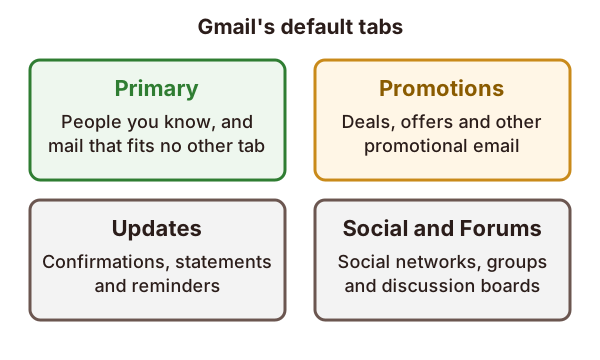
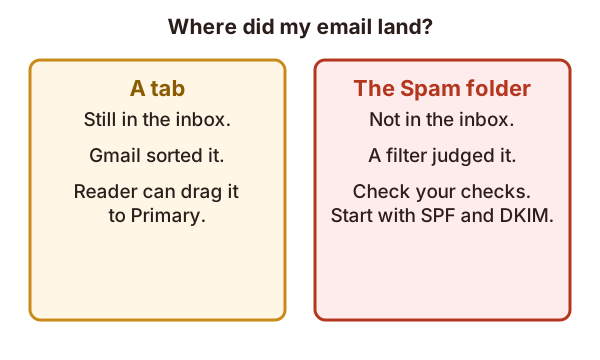
Mail in a tab is still in the inbox. Nobody judged it bad. It was only sorted. Mail in the Spam folder is different. A filter decided against it, and the cause is usually a failed check or a poor reputation. If that's your case, start with why emails go to spam.
Why Gmail picked Promotions
Google says Gmail sorts mail into these tabs automatically.[1] It doesn't publish the rules. So no one outside Google can tell you the exact trigger, and any list of "magic words" is a guess.
What Google does say is that mail meant as a deal or an offer belongs in Promotions.[1] A newsletter full of sales and discount offers fits that description. A short personal note fits Primary.
Receipts and notices are a different type again. Gmail's category for them is Updates, which covers confirmations, statements and reminders.[1]
Keep one kind of message per email
Google gives sender advice that helps here. Don't mix different types of content in one message.[2] Its example is promotions inside a sales receipt.[2]
A receipt with an ad bolted on is part receipt and part offer. Gmail has to pick one. Keep receipts as receipts, and send offers as their own mail.
What you can do
You can't force a tab. These steps are honest ones:
- Send what the reader expects. Mail that reads like a deal will be sorted like one.
- Ask readers to move it. If an email is in the wrong category, the reader can move it.[1] On a computer, they drag it to the right tab.[1]
- Know it teaches Gmail. Google says moving mail helps Gmail learn that reader's preferences.[1] That is one reader's inbox, not a rule for everyone.
Some readers turn tabs off altogether, by changing their inbox type.[1] For them, there is no Promotions tab at all.
When to worry
Landing in Promotions isn't a failure. For a newsletter it's often where readers expect to find it. If you see low opens and you think the cause is spam, check the real thing first. Look at your authentication results in the message headers. A tab can't show up there as a failure, because it isn't one.
Sources
- Organize your emails into categories, Google (Gmail Help) (accessed 2026-10-27)
- Email sender guidelines, Google (Gmail Help) (accessed 2026-10-27)