 Why It Went to Spam
What is an email blocklist, and what if I'm on one?
Short answer
A blocklist is a public list of IP addresses or domains that mail servers use to reject mail or send it to spam. Being listed only matters if it affects your mail. Check your bounces first, find the rejected address, read why it was listed, fix that, then ask the list to remove you.
What a blocklist is
A blocklist is a list of IP addresses or domains that have been tied to spam, malware or other abuse. Mail servers check it when a message arrives. The technical name is a DNS blacklist, or DNSBL.[1]
Each list has its own owner and its own rules. There's no single master list.
How the check works
The receiving server turns your IP address around and adds the list's name. Then it asks DNS about that name.[1] If the list has an entry, the answer also carries a text note that gives the reason for the listing.[1]
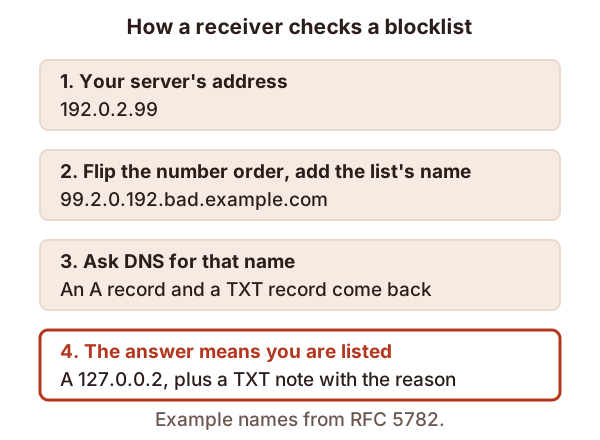
What the receiver does next is up to its admin. Spamhaus says an admin can reject the mail on the spot, or accept it and tag it for more filtering.[2] Tagged mail is how you end up in spam instead of getting a bounce. Google says mail from a listed IP address is more likely to be marked as spam.[3]
Why a legitimate sender gets listed
Not every listing means you did something wrong. Spamhaus says some lists also cover addresses that are legitimate but shouldn't be sending email.[2] One example is its Policy Blocklist. It holds IP space that shouldn't send email directly to the internet.[4] If you send through a proper mail service, that's usually not your problem.
What to do
Go in this order.
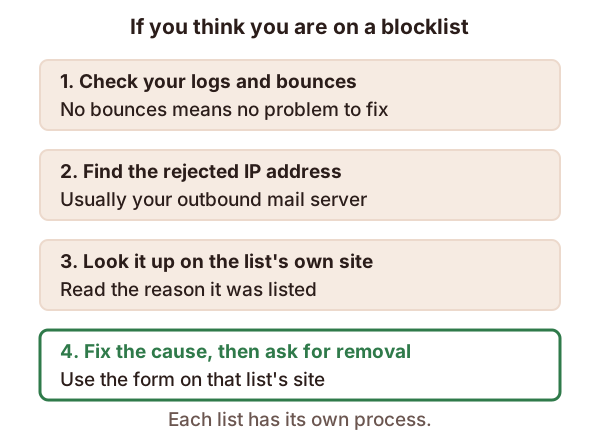
- Look for real bounces. Spamhaus says to check your mail server logs before doing anything.[4] If there are no bounces, there is no problem.[4] Many lists exist, and networks also keep private ones.[4]
- Read the bounce text. It often says why the mail was rejected.[4] Our page on bounce codes helps you read it.
- Find the rejected address. It's generally your outbound mail server's IP address.[4]
- Look it up on that list's own site. The note tells you why it was listed.[1] Fix that cause first.
- Then ask for removal through the list's own process.
If the cause was bad sending habits, the bigger job is rebuilding trust. See sender reputation.
Sources
- DNS Blacklists and Whitelists (RFC 5782), IETF (accessed 2026-10-25)
- Blocklists, Spamhaus (accessed 2026-10-25)
- Email sender guidelines, Google (Gmail Help) (accessed 2026-10-25)
- FAQs: DNSBL usage, Spamhaus (accessed 2026-10-25)